
Cybersecurity researchers from CERT Polska have uncovered a sophisticated Android malware that exploits Near Field Communication (NFC) technology to carry out unauthorised cash withdrawals directly from ATMs.
The malware, known as NGate, allows criminals to withdraw money without stealing physical bank cards. Instead, attackers infect victims’ smartphones and secretly capture sensitive NFC transaction data including one-time payment codes and PINs during a legitimate tap-to-pay or card verification process.
Unlike traditional NFC cloning attacks, NGate targets dynamic NFC transactions, which generate unique, time-limited codes for each payment. When a victim is tricked into performing a fake “card verification” on a malicious app, the malware captures the live NFC data and immediately transmits it to the attackers.
Accomplices, already positioned at ATMs, then use card-emulation devices such as smartphones or smartwatches to imitate the victim’s card and withdraw cash before the codes expire.
Researchers said the attack relies heavily on social engineering. Victims are typically targeted via phishing SMS messages, emails or phone calls impersonating banks, urging them to download a fake banking app from unofficial sources. Once installed, the app requests permissions and guides users through fraudulent verification steps.
Security experts warn that the attack highlights growing risks associated with NFC-based payments when combined with malware and social manipulation. Source: Malwarebytes
HackWarn Analysis
Why This Attack Is Dangerous
NGate represents a major shift in financial fraud by targeting live NFC transactions, not stolen cards. By capturing one-time payment codes and PINs in real time, attackers can bypass traditional card security and drain accounts almost instantly.
How Victims Are Tricked
The scam depends on fear and urgency. Fake bank alerts pressure victims into downloading malicious apps and performing “verification” steps, while accomplices wait at ATMs to cash out within minutes.
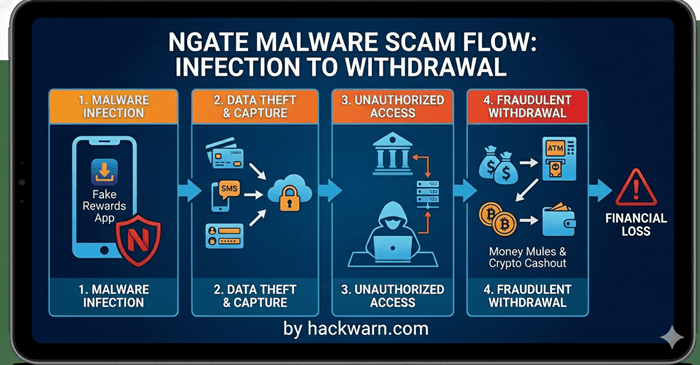
This infographic illustrates the lifecycle of an NGate malware attack, a sophisticated threat that targets financial data and enables unauthorized withdrawals. The image breaks the process down into four clear stages:
1. Malware Infection
The process begins when a user is tricked into downloading a “Fake Rewards App” or a similar malicious application onto their smartphone.
This is often achieved through phishing links or social engineering. The NGate malware (represented by the red shield icon) then installs itself on the device.
2. Data Theft & Capture
Once active, the malware works in the background to harvest sensitive information. It captures:
- Credit/Debit Card Details: Using NFC relay techniques to “read” physical cards near the phone.
- SMS Messages: Intercepting one-time passwords (OTPs) and two-factor authentication codes.
- Login Credentials: Stealing usernames and passwords for banking portals.
3. Unauthorized Access
Equipped with the stolen data, the cybercriminal (the hooded figure) uses servers to bypass security measures. They gain full, unauthorized access to the victim’s bank accounts by masquerading as the legitimate user.
4. Fraudulent Withdrawal
In the final stage, the stolen funds are liquidated. This is done through several methods:
- ATM Withdrawals: Using the relayed NFC data to withdraw cash directly.
- Money Mules: Transferring funds through intermediate accounts to hide the trail.
- Crypto Cashout: Converting the stolen money into cryptocurrency to make it nearly impossible to track.
The End Result: The flow terminates at a red warning sign indicating “FINANCIAL LOSS,” emphasizing the devastating impact this scam has on victims.
Key Warning Signs
- Requests to download banking apps from links instead of official app stores
- Urgent messages claiming account issues
- Instructions to tap cards or enter PINs outside official bank apps
How to Stay Safe
- Only install apps from official app stores
- Never enter PINs or perform card verification via links sent by SMS or calls
- Hang up and call your bank using official numbers
- Keep Android security and anti-malware tools updated