
Online shopping has transformed the way we buy goods, offering convenience and a world of products at our fingertips.
But alongside these benefits comes the increasing risk of online shopping scams. With the rise of online shopping fraud, fake online stores and e-commerce scams, consumers are more vulnerable than ever.
Knowing how to avoid online shopping scams and understanding the common online shopping scam tactics is essential for everyone, from professionals and executives to the elderly.
This article explores 5 best tools to prevent online shopping scams, along with tips and strategies to keep your personal information and money safe.
1. Antivirus and Internet Security Software
One of the foundational steps in protecting yourself against online shopping scams is using a reliable antivirus and internet security software.
These tools do more than detect viruses; they also identify phishing attempts, block fraudulent websites, and prevent malware from compromising your personal data.
Why it Matters
Online scammers often use phishing websites to collect sensitive information. When you visit a fake online store, malware can be installed to steal credit card details or login credentials. The right security software acts as a shield.
Recommended Tools
i. Bitdefender Total Security
Bitdefender earned six “Advanced+” awards and one “Advanced” rating across seven tests, a strong indication of its robust protection, especially during online shopping.
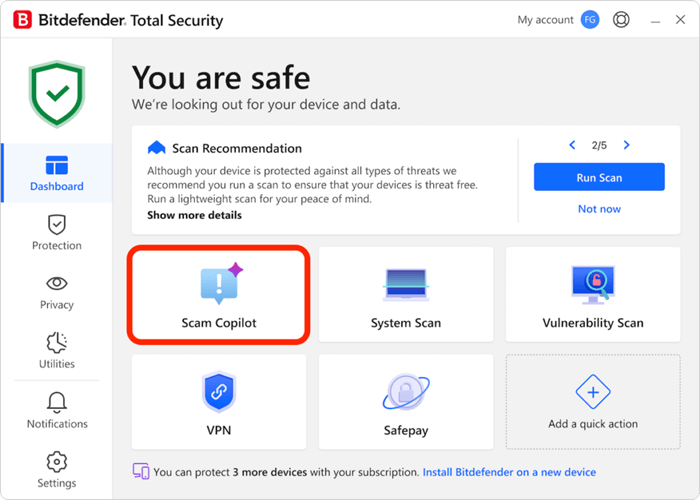
Its Anti-Phishing & Anti-Fraud Protection module detects and blocks fake websites attempting to steal passwords, credit-card information or banking details.
It also alerts you before you click on suspicious links in emails, messages, or social media platforms.
Bitdefender also includes the AI Scam Copilot, an advanced AI feature that helps you identify and stay protected from online scams.
It continuously monitors communication channels including email, web browsing, SMS, chats and even calendar invites to detect and block suspicious activity.
Click here to explore the full power of Bitdefender Total Security’s protection.
ii. Norton AntiVirus Plus (Norton 360)
Apart from antivirus, malware, ransomware and hacking protection, Norton 360 comes with built-in AI-powered Scam Protection designed to keep you safer from modern threats.
Its advanced AI engine helps identify and block online scams, including suspicious messages and even deepfake videos.
With Norton Genie, your personal AI cyber-safety assistant, you’ll get real-time guidance on detecting scams, answers to your security questions and step-by-step support using Norton’s features.
A 14-day free trial is also available for you to experience the protection firsthand.
Experience unbeatable protection. Click here to see what Norton 360 can do for you
iii. Avast Premium Security
Avast includes an AI-powered feature known as Avast Assistant (part of the Scam Guardian suite), which analyzes texts, links, emails and websites to identify potential scam signals before you engage with them.
It also provides real-time website scanning, warning you whenever you’re about to access a fake or spoofed site designed to steal your credentials or personal data, a key layer of protection within its web-security module.
Avast further demonstrates strong anti-phishing performance, reporting a ~96% phishing URL block rate in an independent 2022 test referenced in their official blog.
Click here to get more protection from Avast Premium Security
2. Virtual Private Network (VPN)
Using a VPN is one of the most effective ways to protect yourself from online shopping scams.
A VPN encrypts your internet traffic, making it extremely difficult for hackers to intercept sensitive information like passwords, credit-card numbers or login sessions.
This becomes even more important when you’re on public Wi-Fi whether it’s at a café, airport, hotel or any shared hotspot.
According to Network Computing reports in 2023, more than 2,800 major data breaches were reported, illustrating the scale of risk from unsecured network environments which include public Wi-Fi.
You never truly know how secure these networks are, and a VPN provides the essential layer of protection needed when making online transactions on the go.
For those who regularly access vendor portals, payment systems or sensitive credentials especially in environments like healthcare procurement or multi-site operations a VPN is a must.
It meaningfully strengthens your overall security posture. While it’s not a complete solution on its own, it serves as a strong foundational layer in a well-rounded cybersecurity strategy.
How VPN Protect The Connection
Many scams happen over public Wi-Fi or unsecured networks. A VPN hides your IP address and encrypts the connection, which is particularly useful when shopping during holiday shopping scams spikes, such as Black Friday or Cyber Monday.
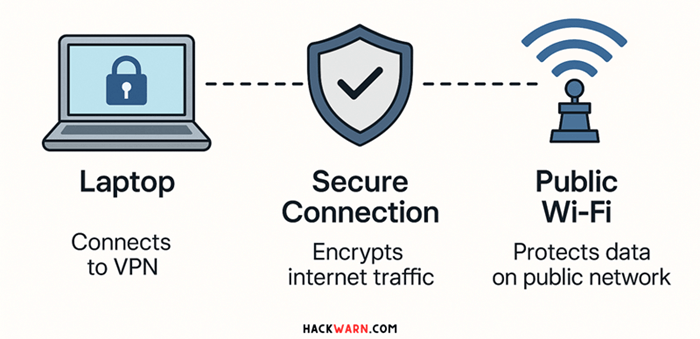
This diagram illustrates how a VPN secures your connection when using public Wi-Fi. On the left, a laptop connects to the internet through a VPN, represented by a secure lock icon.
The middle shows a shield labeled “Secure Connection,” highlighting that the VPN encrypts all internet traffic.
On the right, a public Wi-Fi hotspot is shown, indicating that even though you’re connected to an open network, your data remains protected due to the encrypted VPN tunnel between your device and the internet.
A VPN also provides extra protection for how to check if an online shop is legit by masking your location and reducing the risk of targeted scams.
Read more: 5 Best Scam Website Checkers to Verify Legitimacy in 2025 (With Case Studies)
Recommended VPNs
i. NordVPN
NordVPN isn’t just about hiding your IP address. The Threat Protection Pro™ feature adds a powerful layer of online safety, especially for those who shop frequently on the web.
This advanced module includes fake-shop detection and according to NordVPN’s blog, it actively blocks malicious websites, phishing scams, and malware before they can trick you during online transactions.
One of the standout benefits is that Threat Protection Pro works even when the VPN is turned off.
That means its web-filtering and anti-phishing engine continues protecting you in the background, scanning URLs and blocking harmful pages without needing a secure tunnel running 24/7.
Independent reviewers have also taken notice. In a 2024 TechRadar assessment, NordVPN was ranked among the top tools for avoiding online-shopping scams, outperforming many of the 35 competing services tested.
What makes this protection so effective is the multi-layered approach:
- Intelligent URL filtering
- A constantly updated database of known scam and fraud domains
- Real-time blocking of phishing attempts and fake shopping sites
Together, these features turn NordVPN into more than just a privacy tool. It becomes a comprehensive shield for safer shopping and browsing online.
Click here for more info about NordVPN.
ii. ExpressVPN
ExpressVPN keeps your browsing secure by encrypting your entire connection, making it significantly harder for attackers to intercept your credentials, credit-card details, or session cookies.
This added layer of protection is especially valuable when you’re shopping or banking online from cafés, airports or any public Wi-Fi network.
On top of that, ExpressVPN’s Threat Manager works quietly in the background, monitoring your traffic at the DNS and connection level.
It automatically blocks access to known malicious or phishing domains, helping you avoid dangerous links and fake websites before you even reach them.
Click here to learn more about ExpressVPN
iii. Surfshark
Another best VPN for online shopping protection is Surfshark.
One of its standout features is CleanWeb, a built-in tool that blocks malicious ads, trackers and known scam or phishing URLs, helping you avoid fake stores and dangerous links before you even see them.
Surfshark has also introduced a web content-blocking module that filters out high-risk categories like phishing and malware sites on Android and iOS, with support for more platforms on the way.
This adds an extra layer of security when you’re browsing or checking out on mobile.
One of Surfshark’s biggest advantages is its support for unlimited simultaneous connections. That means you can secure your laptop, phone, tablet and even home devices under a single subscription.
So, perfect for families or anyone with multiple gadgets.
With powerful encryption, a massive server network spanning over 100 countries and 3,000+ servers, and modern VPN protocols designed for both speed and coverage, Surfshark delivers a fast, private and secure shopping experience wherever you are.
Click here to learn more about Surfshark
3. Browser Extensions and Anti-Phishing Tools
Many tools to prevent online shopping scams come in the form of browser extensions that identify signs of a fake online store.
These tools analyze websites for suspicious URLs, fraudulent certifications, and unusual patterns.
Key Features
- Warns users before they enter a potentially unsafe website.
- Checks the reputation of online stores.
- Alerts you to online retail fraud attempts in real-time.
Read more: The Rise of Deepfake Scams: What They Are and How to Detect and Prevent AI-Powered Fraud
Recommended Tools
i. McAfee WebAdvisor
It’s a browser add-on designed to help you avoid risky websites, phishing pages and malicious downloads all without slowing you down.
WebAdvisor scans websites before you visit them and highlights whether they’re safe or suspicious. When you search on Google, Bing, or Yahoo, you’ll see safety ratings next to each result, helping you avoid dangerous links at a glance.
If you accidentally click a fraudulent shopping site or a spoofed login page, WebAdvisor steps in with a clear warning screen. It’s especially helpful for blocking phishing attempts that try to steal passwords, credit card details or personal info.
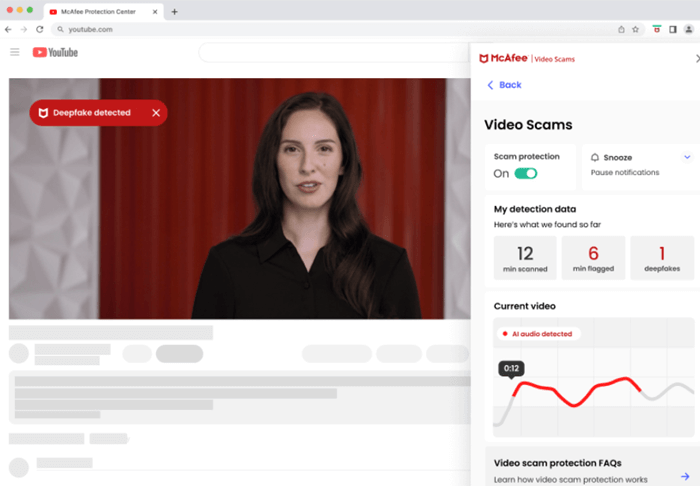
The broader suite, including the feature McAfee Scam Detector, supports deepfake video detection (mainly detecting AI-generated audio in videos) on selected hardware and platforms.
Get McAfee WebAdvisor for free here.
ii. Avast Online Security & Privacy Extension
If you want an easy way to boost your online safety without installing a full security suite, the Online Security & Privacy browser extension is a great place to start.
It’s completely free and adds an extra layer of protection every time you browse, shop, or check email.
The extension works quietly in the background to block malicious websites, warn you about phishing attempts, and stop dangerous trackers from following your activity across the web.
It also helps identify fake or suspicious sites before you click, making it especially useful for online shopping and banking.
Get Avast Online Security & Privacy Extension for free here.
4. Password Managers
A password manager is a simple yet powerful tool that securely generates, stores, and autofills all your login details inside an encrypted “vault.”
Instead of guessing dozens or even hundreds of passwords, you only need to remember one strong master password. The manager handles the rest.
This becomes especially important when shopping online. From retailer accounts and payment gateways to loyalty programs and delivery apps, every purchase adds another login to your digital footprint.
Using a password manager means you can create a unique, complex password for every site, ensuring that if one account is breached, the rest stay protected.
And the risks are real. According to Demandsage, weak or reused passwords are responsible for around 30% of global data breaches, while poor password practices contribute to up to 81% of corporate breaches.
With numbers like these, relying on memory or reusing the same password everywhere simply isn’t enough.
Recommended Tools
i. Bitwarden
Bitwarden stands out as one of the most trusted password managers thanks to its fully open-source architecture, giving users complete transparency into how the platform works.
Unlike many competitors, its code is publicly audited and community-reviewed, which strengthens trust and accountability.
Bitwarden offers end-to-end encryption, unlimited devices, secure password sharing and a highly flexible vault system all at one of the most affordable price points in the market.
What truly sets Bitwarden apart from others is its combination of openness and customizability. Advanced users can self-host their own Bitwarden server.
ii. 1Password
1Password stands out for its exceptional balance of security, usability, and polish. It offers a beautifully designed interface that makes managing logins effortless across all devices.
Its signature feature, Watchtower, continuously monitors your accounts for weak, reused or breached passwords, and even alerts you about website vulnerabilities and expired two-factor settings giving you a proactive layer of protection that goes beyond basic vault storage.
1Password also supports Passkeys, secure sharing, and multi-vault organisation, making it ideal for users who want both simplicity and advanced control.
iii. Keeper
Keeper positions itself as a high-security password manager, suitable for both individuals and businesses.
Zero-knowledge encryption, AES-256 encryption, wide platform support, and advanced features such as secure file storage, sharing and emergency access.
Well suited for scenarios where credential security is critical (e.g., vendor portals, procurement systems, high-value accounts).
Consideration: Free version is limited (often one device) so value depends on your usage scenario.
5. Two-Factor Authentication (2FA)
Two-Factor Authentication (2FA) is an extra layer of security that requires something you know (your password) and something you have (a verification code or approval on your phone).
Even if a scammer steals your password through phishing, fake websites or online-shopping scams, they cannot log in without the second verification step.
2FA is one of the most effective defenses against account takeover especially when shopping online where payment data, saved cards and delivery addresses are at risk.
All you is to install to your mobile phone as the request code will be send to the 2FA apps.
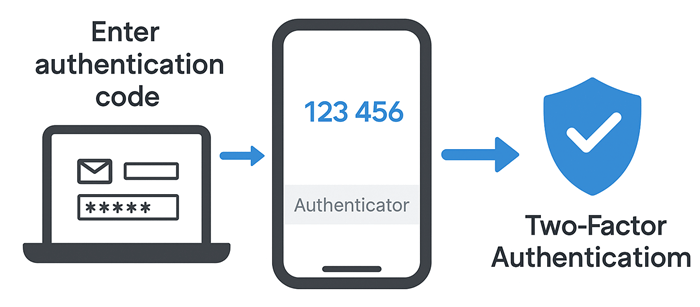
This image illustrates how Two-Factor Authentication (2FA) works during a login process. A user first enters their email and password on a laptop.
Then, they must retrieve a one-time authentication code from an authenticator app on their mobile phone.
After entering the correct code, the login is verified and protected, represented by a shield icon showing that 2FA adds a strong security layer before granting access.
Why 2FA Is Important for Online Shopping Safety
Online shopping scams often work by tricking users into giving away passwords through:
- Fake login pages
- “Payment failed” phishing emails
- Malicious ads or fake shopping sites
Even if you accidentally enter your password on a scam website, 2FA stops the attacker in their tracks because they cannot access your account without the second authentication step.
This prevents unauthorized purchases, protects saved credit cards, and blocks account takeovers.
Recommended tools:
i. Google Authenticator
Google Authenticator is a simple, widely-used 2FA app that generates time-based one-time passwords (TOTP) every 30 seconds. It works offline, supports many websites and apps, and provides an extra layer of security without needing SMS.
Why it’s useful:
- No internet or mobile signal required
- Fast, secure, and easy to set up
- Reduces the risk of SIM-swap and SMS-based scams
- Works with many online shopping sites and payment platforms
Google Authenticator is a great choice if you want lightweight, reliable protection without complications.
2. Microsoft Authenticator
Microsoft Authenticator offers both TOTP codes and push-notification approvals, where you simply tap “Approve” on your phone. It also supports passwordless sign-ins for major platforms.
Why it’s useful:
- Push authentication is harder for scammers to bypass
- Supports cloud backup and device recovery
- Works across Microsoft services and thousands of other websites
- Offers additional security checks like number-matching to stop phishing attempts
Microsoft Authenticator is ideal for users who prefer convenience without sacrificing strong protection.
Additional Tips to Avoid Online Shopping Scams
1. Check Reviews and Ratings: Legitimate stores have real reviews. Watch out for overly positive or generic comments.
2. Verify Contact Information: A legitimate online shop should provide a phone number, email, and physical address.
3. Look for HTTPS and Security Certificates: A padlock icon in the browser indicates the site encrypts your data.
4. Avoid Too-Good-To-Be-True Deals: Scammers lure victims with unrealistically low prices, especially during holiday shopping scams.
5. Stay Updated on Scam Alerts: Follow shopping scam alerts from authorities and consumer protection organizations.
Common Online Shopping Scam Tactics to Watch Out For
- Fake Online Stores: Scammers copy branding from legitimate retailers.
- Phishing Emails: Emails that look like confirmations or deals but link to fraudulent sites.
- Social Media Scams: Ads or posts promoting unbelievable deals that redirect to online shopping fraud.
- Payment Redirection: Asking for direct bank transfers or crypto payments.
- Counterfeit Products: Selling fake goods that never arrive.
Understanding these tactics helps you stay one step ahead of scammers.
Conclusion
Shopping online offers convenience, but online shopping scams continue to grow in sophistication.
By using the 5 best tools to prevent online shopping scams antivirus software, VPNs, browser extensions, password managers and 2FA tools you can significantly reduce your risk.
In addition to these tools, being aware of common online shopping scam tactics, recognizing signs of a fake online store, and following safe online shopping tips for beginners will help you shop confidently and protect your finances.
No tool can guarantee 100% protection: Some fake websites or phishing attacks are extremely new or highly targeted (spear-phishing). Good browsing habits remain important.
Stay alert, use the right tools, and you’ll enjoy a secure purchase every time.
One thought on “Secure Purchase: 5 Best Tools to Protect Online Shopping Scams”